“Not very good even with firmware 2.7 can’t find any update on the www, does not work with modern cars could not reset 2009 Skoda Octavia 1.6tdi service light waste of money” (Mark, Aug 2013)
“The instructions on how to update the software weren’t included in the purchase.” (Sholdon, Jan 2014)
“Sadly there is no way to contact the manufacturer for a software update, as it’s not given on the product or listed in the booklet.” (K. Hopkins, Dec 2013)
“My only issue is trying to update online, i connected the tool to my laptop and the device driver loaded no problem, however i still have no icon on my laptop or listed programme where I can access the tool or manufacturers website.”(John, May 2012)
“Unable to update software on the internet but overall quite a good tool” (Dave, Sep 2010)
We have attempted to contact www.vgate.com.cn several times, however we have never received a response. We have also made attempts in the past to update the product using software provided by Autel and Sealey, however, although their software recognised the Vgate VS450, applying an update was unsuccessful. Systems such as UpdateStar also failed in our testing and appear to be almost useless, based on the customer rating of 1 out of 5 stars.
It does seem to be luck of the draw concerning which firmware version of the Vgate VS450 you will receive from suppliers. The most common version of firmware – and the one we use on a regular basis is 2.7 – however you may be lucky and receive version 3.8, although none of the VS450’s we have access to have version 3.8. Firmware version 2.7 appears to work reliably on VAG cars up to around 2008, depending on the model. You may have a different experience as we have heard the VS450 works perfectly on the 2013 VW Move Up and even the 2011 Peugeot 308. If you want to be 100% sure that the diagnostic equipment you purchase will be compatible with the latest vehicles and will continue to receive updates in order to be compatible with future vehicles we recommend http://www.ross-tech.com/
If you have had any luck with the VGate Scan VS450 update process or have managed to get further than we have, either successfully updating or not, please get in touch.
If you have an older vehicle or want to take the risk with a Vgate VS450, they provide excellent value for money and are a perfect addition to the DIY mechanics tool box.

Firstly the box, this is good and sturdy with a glossy finish. Its dimensions are:
L = 250mm
W = 185mm
D = 70mm
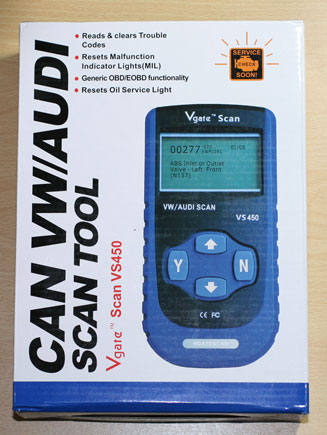

Included in the box
Vgate scan VS450

The Vgate Scan VS450 is a solid piece of kit, has a good quality feel, should last a long time. It has chunky, easy to use, clearly marked buttons and a large, backlit LCD display. The plastic is rigid and strong and it is the perfect size to nestle nicely in the hand. Although solid, it is not too heavy – a comfortable weight for most users.
Its dimensions are:
L = 175mm
W = 90mm
D = 30mm (+ buttons = 35mm)
Unit weight = 246g
Whole package excluding box = 628g

Cables – both are a good length
The 15 pin serial to USB for connecting to a computer is 4 foot long so provides ample range for comfortably connecting your Vgate Scan VS450 to your computer.

The 15 pin serial to standard OBD-II connection, the OBD-II should be within 2 foot of the driver so the 5 foot long cable allows you to use the Vgate Scan VS450 whilst looking under the bonnet of most vehicles.

A user manual
Not very useful and provides only limited instructions, however instructions are not really necessary as it’s so easy to use – only 20 pages long
A carry case
Cheap feeling, not very thick fabric and not very protective, the embroidered wording is already becoming unravelled and we have hardly touched it! Although it is already beginning to look a little tatty, the case would prevent oil from getting on the Vgate Scan VS450.

A detailed review of the Vgate Scan VS450 is coming soon, however in the meantime, please note that no installation CD is included in the box and the instructions make no reference to a website where software can be downloaded in order to update the Vgate Scan VS450.

For more information about the VS450 view our Vgate Scan VS450 product page.
]]>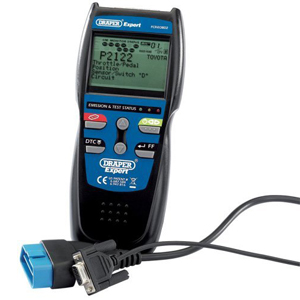
The Draper Expert 43913 EOBD2 is designed to read and diagnose engine codes and switch off engine warning lights using the vehicle on board diagnostic port.
USER FRIENDLY
Simple and easy to use with EOBD-compliant engines in post 2001 and post 2004 diesel vehicles, this hand held, light weight fault-code reader supports J1850 VPW, J1850 PWM, ISO 9141, KW2000 and CAN (including extended CAN) protocols.
COMPREHENSIVE MENU
Reads engine fault codes and extracts freeze frame data within 25 seconds
Screen displays 25 items of information at once
Pre-loaded with over 22,000 code definitions
Not necessary to connect to vehicle to access memory and identify DTC problems
Engine code reader/eraser
Auto link and memory features
AFTER SALE
Manufacturer warranty
Weight : 998g
PACKAGE CONTENTS
- Draper Expert 43913 EOBD2 Tool
- Software CD ROM
- EOBD cable
- RS232 cable
- Storage case
From:
£140.99
]]>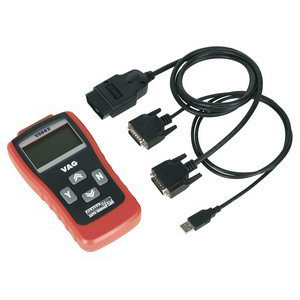
The Sealey VS862 VAG code reader, diagnostic tool is a hand held, stand alone unit, designed to work with Audi, VW, Seat and Skoda vehicles equipped with Controller Area Network (CAN) protocol..
USER FRIENDLY
Very simple to use with a large, easy to read LCD display screen and intuitive controls. The menu driven software communicates safely with the vehicle on board computer allowing the user to read and reset fault codes and switch off warning lights.
COMPREHENSIVE MENU
Reads and clears diagnostic trouble codes (DTCs) for:
- Engine
- ABS
- Airbags
- Transmission
- Radio
- Climate control (A/C)
- Steering wheel
- Immobilizer vehicle modules
- Resets oil service light
- Retrieves vehicle information (VIN)
- Displays I/M readiness status
- Displays OBDII freeze frame data
- Turns off malfunction indicator lamp (MIL) for engine, airbag, ABS, auto transmission
AFTER SALE
Limited one year warranty
Manufacturer online updates
Optional connector lead available for 2 pin VAG applications
DIMENSIONS
Length : 178mm
Width : 95mm
Height : 34mm
Weight : 821g
PACKAGE CONTENTS
- SEALEY VS862 VAG Code Reader
- Software CD ROM
- Nylon carry case
- EOBD cable
- USB cable
From:
£215.80
]]>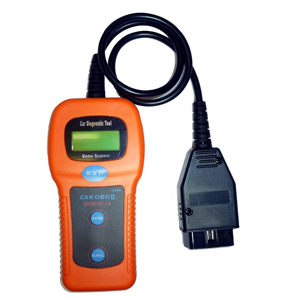
Hand held, light weight, stand alone device designed for use with VW, Audi, Seat and Skoda vehicles, this self contained unit reads and resets fault codes and warning lights.
Ease of Use
Easy to use, supplied with full user instructions, no batteries required, completely self contained, stand alone unit that plugs straight into the vehicle diagnostic socket. Fault codes listed in reference manual, reset codes and turn off warning lights with the push of a button.
Menu
- Reads fault codes
- Resets fault codes
- Turns off warning lights
- Check VIN
- CAN BUS protocols
- Non listed codes available online
AFTER SALE
Mobile app available
Non listed codes available online
DIMENSIONS
Height : 15 cm
Width : 8 cm
Depth : 2.5 cm
Weight : 349g
PACKAGE CONTENTS
- U281 OBD-2 CAN-BUS
- OBD2 Cable
- Full user manual
Please Note:
On some vehicles an error connection is displayed and the scanner is limited in what it can adjust / scan. We are currently aware of an issue with the Skoda Fabia 1.4 Greenline and 1999 Golf 1.4s Mk 4.
From:
£16.99
]]>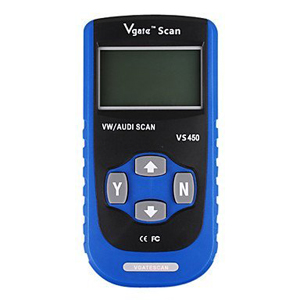
The Vgate SuperScan VS450 Scantool is an original equipment manufacturer (OEM) level diagnostic tool for the majority of post 1990 Volkswagen/Audi models, it replaces the obsolete VAG405 which is no longer produced. The EOBD function means the VS450 will also operate on non Volkswagen/Audi vehicles, although not to the same extent.
USER FRIENDLY
Easy to use, with an intuitive interface, the VS450 reads, scans and clears/erases on board diagnostic (OBD) and fault/diagnostic trouble codes (DTC) including those of the engine and transmission, ABS, immobiliser, airbags, A/C/climate control, radio, steering wheel instrumentation, central locking, etc. This stand-alone unit communicates safely and easily with on board computers, displaying results on a large, backlit LCD screen the VS450 has a comprehensive menu of tests and diagnostics.
With Controller Area Network capability (CAN) the VS450 reads, scans and clears/erases using ISO 15765 (CAN), ISO 9141-2 (CARB) and ISO 14230 (KWP-2000) protocols.
COMPREHENSIVE MENU
- Reset oil service light
- Reset oil and inspection service interval
- Turn off MILs of engine, airbag, ABS , A/T and most other systems
- Retrieve vehicle information
- Display I/M Readiness Status
- Display DTC definitions on unit screen
AFTER SALE
One year warranty
Results will vary depending on vehicle make, model and specification
DIMENSIONS
Height : 8 cm
Width : 20 mm
Length : 17 cm
Weight : 550gms
PACKAGE CONTENTS
- Vgate SuperScan VS450 Scantool
- OBD2 Cable
- Carry Case
- Nylon bag
- Full user manual
From:
£26.99
]]>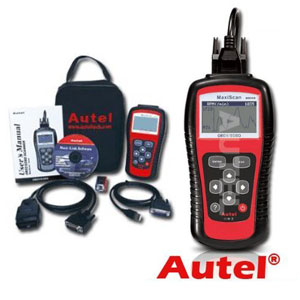
The MS509 car fault code reader allows easy access to a vehicle computer via its diagnostic port. CAN enabled, it is designed for use on all 1996 and later European, Asian and US vehicles with OBD2 compliance.
USER FRIENDLY
This sophisticated but simple to use, hand held tool displays DTC definitions on a large, backlit LCD screen. CAN enabled, it reads and clears fault codes and switches off warning lights via the vehicle OBD port.
COMPREHENSIVE MENU
Multi lingual menu
Built-in OBD-2 DTC library
Prints data via PC
Diagnose and turn off “Check Engine Light ( MIL)”
Retrieves vehicle information (VIN, CIN and CVN)
Supports CAN (Controller Area Network
Displays DTC definitions on unit screen
Displays live O2 sensor test data
The Autel MS509 works on the following 9 OBD 2 protocols:
- SAE J1850 PWM (41.6 kbaud)
- SAE J1850 VPW (10.4 kbaud)
- ISO 9141-2 (5 baud init, 10.4 kbaud)
- ISO 14230-4 KWP 2000 (5 baud init, 10.4 kbaud)
- ISO 14230-4 KWP 2000 (fast init, 10.4 kbaud)
- ISO 15765-4 CAN (11 bit ID, 500 kbaud)
- ISO 15765-4 CAN (29 bit ID, 500 kbaud)
- ISO 15765-4 CAN (11 bit ID, 250 kbaud)
- ISO 15765-4 CAN (29 bit ID, 250 kbaud)
AFTER SALE
Online update facility
DIMENSIONS
Length : 178mm
Width : 95mm
Height : 35mm
Weight : 955 grams
PACKAGE CONTENTS
- Autel MS509 unit
- Instruction booklet
- Software CD including DTC definitions, update program and instruction manual
- USB lead
- OBD2 lead
- PP9 battery
- Carry case
From:
£69.99
]]>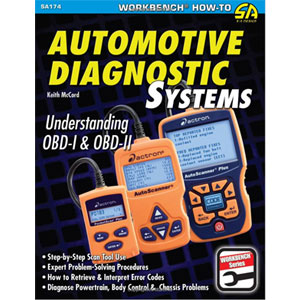
Automotive Diagnostic Systems: Understanding Obd I & Obd II by Keith McCord is a book designed for anyone who wants to work on the motor car of today, from the professional motor mechanic to the DIY enthusiast, this book will guide you through the complexities of using a diagnostic scanner via the vehicle on board diagnostic port. The book describes the history of automotive on board diagnostic systems, from the original Obd I to the present motor industry standard Obd II. Detailed explanation of the system is provided, describing the all the features and capabilities and full instructions are given in a clear and concise language that even the beginner will understand. This book is recommended as an easy reference guide for anyone wanting information on using a diagnostic scanner.
Author : Keith McCord
Language : English, German, French, Italian, Spanish, Danish, Hindi, Chinese, Japanese, Korean, Welsh
ISBN-10: 1934709069
ISBN-13: 978-1934709061
From:
£11.99
]]>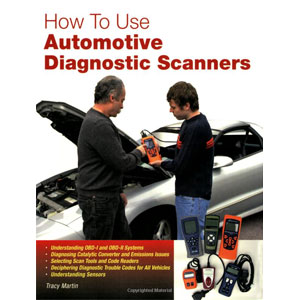
The car mechanic or DIY enthusiast of today requires diagnostic equipment to effectively work on modern cars. There are so many different types of diagnostic scanners on the market these days; from lightweight, hand held, dedicated units to software operated through your laptop or PC via the vehicle on board diagnostic port, this book is a wonderful guide for everything from choosing the right diagnostic tool to using the equipment correctly. Fully illustrated with photographs and diagrams, How to Use Automotive Diagnostic Scanners teaches you how to use your chosen diagnostic scanner and what each code means, it explains how OBD-I and OBD-II systems (including CAN) operate and includes a comprehensive list of codes and their meanings. This great instructional and reference book is well laid out and easy to understand, the perfect addition to any motor enthusiasts library.
Author: Tracy Martin
Language : English
ISBN-10: 0760328005
ISBN-13: 978-0760328002
From:
£12.15
]]>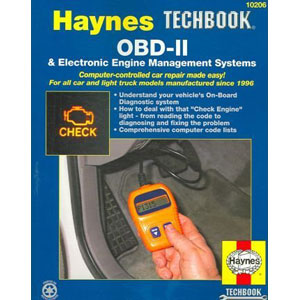
If you are struggling to get the hang of your diagnostic equipment a Haynes manual is always a good place to start. This manual takes the mystery out of On-Board Diagnostic Systems, so you know what to do when you see the “Check Engine” light.
This manual also includes generic codes for many modern vehicles and even component replacement procedures. Haynes Engine Management Systems is also fully illustrated with over 250 drawings and photographs.
Author : John H Haynes
Author : Bob Henderson
Language : English
ISBN-10 : 1563926121
ISBN-13 : 978-1563926129
From: